QiliSDK 0.2.0: A Unified Framework for Analog, Digital, and Hybrid Quantum Computing

1. Introduction to QiliSDK

An overview of the QiliSDK architecture. The top layer contains the primitive components: cost functions, optimizers, analog and digital abstractions, and readout methods. The middle layer combines these primitives into complex workflows such as variational algorithms and functionals. The bottom layer handles execution, supporting real quantum hardware (QPU), classical simulation (GPU and CPU), and noise models.

Quantum computing today is divided into two main paradigms. The digital (gate-based) model represents algorithms as circuits composed of discrete quantum gates. In contrast, the analog (Hamiltonian-based) model drives computation through the continuous time evolution of a quantum system, which is the native language of quantum annealers, adiabatic processors, and the analog QPUs that Qilimanjaro builds. Most existing software stacks are built around one paradigm and cannot easily execute workloads from the other. QiliSDK takes a different approach and unifies both paradigms in a single open-source Python framework. It provides a comprehensive API covering gates, circuits, Hamiltonians, schedules, optimization models, and observables, while remaining fully backend-agnostic: the same program can run on a CPU, GPU, or QPU by changing a line of code. QiliSDK is built around the following components:
  • Primitive Modules used to construct quantum workflows:
    • Analog: containing Hamiltonian and Schedule classes to define analog quantum workflows.
    • Digital: offers Gate, Circuit, and pre-built Ansatz classes to define digital quantum workflows.
    • Core: consisting of QTensor the fundamental quantum-tensor type, together with a parameter/variable system used to build an optimization Model. Generic optimization models are automatically linearized into QUBO form and can be exported as a Hamiltonian.
    • Readout: methods to extract information from the quantum system after execution, including measurement samples, expectation values, or full-state tomography.
  • Functionals: a unified abstraction for quantum workflows (sampling a circuit, evolving a Hamiltonian, running a variational program). Any functional can be dispatched to a compatible backend for execution through a common interface backend.execute(functional).
  • Backends: run Functionals on a CPU, GPU, or QPU.
    • CPU: the built-in QiliSim simulator supports digital, analog, and hybrid workflows. In addition, the QuTiP backend allows QiliSDK Functionals to be executed directly using the QuTiP library.
    • GPU: a wrapper built on top of NVIDIA’s CUDA-Q library, enables the execution of both digital and analog QiliSDK workflows directly on a GPU.
    • QPU: the SpeQtrum backend executes QiliSDK Functionals on Qilimanjaro’s QPUs.
QiliSDK is open, modular, and easy to install with pip install qilisdk. Optional extras provide support for GPU acceleration (cuda12/cuda13), QuTiP, OpenQASM, QIR, and other integrations. QiliSDK is available on PyPI, documented at qilimanjaro-tech.github.io/qilisdk, and citable via Zenodo (DOI 10.5281/zenodo.20411054).

What’s new in 0.2.0. This release introduces QiliSim, a high-performance quantum simulator written in C++; a comprehensive noise-modeling framework covering digital, analog, and parameter noise; quantum reservoir computing primitives; migration of the core QTensor type to C++; interoperability with OpenQASM 2/3 and QIR; Trotterization of analog evolution; a composable circuit transpilation pipeline; and an expanded tutorial set with translations into Spanish and Catalan. The following sections cover each of these additions in more detail.

2. QiliSim: Qilimanjaro’s New Simulation Backend

QiliSim is Qilimanjaro’s native quantum simulator, implemented in C++ and accessible from Python. It is the default backend for simulating quantum circuits, Hamiltonian time evolution, and analog-digital quantum reservoirs. For small to medium problem sizes, QiliSim can achieve performance comparable to, and in some cases better than, GPU-based backends on standard CPU hardware.

The example below illustrates how to execute a digital quantum workload with QiliSim. A simple two-qubit Bell-state circuit is constructed, wrapped in a DigitalPropagation Functional, and executed on the QiliSim backend. A sampling readout is then applied to collect 500 measurement shots from the final quantum state that can be used for further analysis.

				
					from qilisdk.digital import Circuit, H, CNOT
from qilisdk.backends import QiliSim
from qilisdk.functionals import DigitalPropagation
from qilisdk.readout import Readout

# Build a simple circuit
circuit = Circuit(2)
circuit.add(H(0))
circuit.add(CNOT(0, 1))

# Create DigitalPropagation functional
functional = DigitalPropagation(circuit)

# Execute with the QiliSim backend
backend = QiliSim()
result = backend.execute(functional, Readout().with_sampling(nshots=500))
print(result.get_samples())


Configurable simulation methods

QiliSim provides a set of simulation strategies through structured configuration objects (ExecutionConfig, DigitalMethod, AnalogMethod, MonteCarloConfig).
  • Digital (circuit) simulation uses state-vector propagation. By default, a matrix-free implementation is enabled (DigitalMethod.statevector(matrix_free=True)), which avoids materializing large gate matrices.
  • Analog (time-evolution) simulation supports several integrators:
    • AnalogMethod.integrator(): optimized fixed-step integrator (about 4× faster in 0.2.0), matrix-free by default.
    • AnalogMethod.adaptive_integrator(): adaptive Dormand–Prince RK45 scheme with automatic step selection.
    • AnalogMethod.arnoldi(): Arnoldi/Krylov-subspace exponentiation for stiff or large systems.
    • AnalogMethod.direct(): direct matrix exponentiation, suitable for small systems.
  • Monte-Carlo trajectory simulation can also be layered on top of any of the above (MonteCarloConfig(trajectories=…)).
The example below shows how a simulation method is configured in QiliSim. In this case, an analog time evolution is performed using the adaptive Dormand–Prince RK45 integrator (AnalogMethod.adaptive_integrator) with a relative tolerance of 10⁻³, while Monte Carlo trajectory simulation is enabled with 200 trajectories. Because simulation strategies are specified through configuration objects rather than embedded in the workload itself, the same quantum program can be executed with different numerical methods simply by changing the configuration.
				
					from qilisdk.backends import QiliSim, ExecutionConfig, AnalogMethod, MonteCarloConfig

backend = QiliSim(
    execution_config=ExecutionConfig(
        analog_method=AnalogMethod.adaptive_integrator(tol=1e-3),
        monte_carlo=MonteCarloConfig(trajectories=200),
    )
)


In addition, QiliSim supports density-matrix initial states, mid-circuit measurements, and the noise-model framework described in the next section.

3. Noise Models

QiliSDK 0.2.0 introduces a unified noise-modeling framework. A NoiseModel can be built once and applied consistently across both QiliSim and the CUDA backend.

Note: Noise Models are currently supported only on QiliSim and CUDA backends. The QuTiP backend doesn’t support them yet.

The framework describes noise along two dimensions. The first is what is perturbed:
  1. The quantum state (channel noise): predefined channels BitFlip, PhaseFlip, Depolarizing, AmplitudeDamping, Dephasing, and the general PauliChannel.
  2. The control parameters (parameter noise): GaussianPerturbation, OffsetPerturbation, and the base ParameterPerturbation, capturing imperfect calibration.
  3. The measurement outcomes (readout noise): represented through ReadoutAssignment.
The second dimension is how the noise is represented: as a KrausChannel (used for digital execution) or as a LindbladGenerator (used inside analog open-system evolution). Every channel type in the list above implements both representations, so the same NoiseModel runs unchanged on either digital or analog backends.

An overview of the QiliSDK architecture. The top layer contains the primitive components: cost functions, optimizers, analog and digital abstractions, and readout methods. The middle layer combines these primitives into complex workflows such as variational algorithms and functionals. The bottom layer handles execution, supporting real quantum hardware (QPU), classical simulation (GPU and CPU), and noise models.

In the example below, a BitFlip channel with a 2% error probability is applied to qubits 0 and 1 using the QiliSim backend. Because noise models are backend agnostic, the same definition can be reused unchanged on the CUDA backend to execute the simulation on a GPU. The documentation also provides a mathematical description of each sup<ported noise type.

				
					from qilisdk.noise import NoiseModel, BitFlip
from qilisdk.backends import QiliSim

noise = NoiseModel()
noise.add(BitFlip(probability=0.02), qubits=[0, 1])

backend = QiliSim(noise_model=noise)  # identical API on the CUDA backend


4. Quantum Reservoir Computing

QiliSDK 0.2.0 introduces support for Quantum Reservoir Computing (QRC), a quantum machine-learning paradigm in which a fixed quantum system (the “reservoir”) projects inputs into a high-dimensional feature space. Only a simple linear classical readout layer is trained, while the quantum dynamics are observed, not trained. This approach leverages the natural dynamics of the quantum system, making it well suited to near-term analog quantum hardware.

The API introduces three primitives:

  • Quantum Reservoir: top-level component that orchestrates a sequence of reservoir layers.
  • Reservoir Layer: single layer template with three sequential stages: input_encoding → evolution_dynamics → output_encoding. The evolution is driven by an analog Schedule, while optional single-qubit encoding circuits can be used to inject input data and post-process data. Selected qubits can also be reset between consecutive layers.
  • Reservoir Input: non-trainable parameter used to inject layer-wise data into the reservoir. Inputs can be incorporated anywhere in a layer: as parameters of gates in the input or output encoding circuits, or as coefficients on the local fields and couplings of the analog evolution Hamiltonian.

The quantum reservoir layer workflow. Each layer consists of optional digital pre- and post-processing steps surrounding an analog evolution, any of which can serve as data input points. The state is then measured and qubit-reset, producing an output that is passed to the next reservoir layer.

Backends execute reservoir workflows natively, injecting inputs at each layer through the encoding stages and collecting the observables measured after every layer as a feature vector for downstream learning.

The example below defines a two-qubit quantum reservoir in which layer-specific inputs are injected through a parameterized encoding circuit. Each layer evolves under an analog Hamiltonian featuring local fields and qubit-qubit interactions, with one qubit reset between layers. The reservoir is executed on QiliSim, and expectation values of selected observables are measured after each layer, producing the feature vectors.

				
					import numpy as np
from qilisdk.backends import QiliSim
from qilisdk.core import ket, QTensor
from qilisdk.digital import Circuit, U2
from qilisdk.functionals.quantum_reservoirs import QuantumReservoir, ReservoirInput, ReservoirLayer
from qilisdk.analog import Schedule, X, Z
from qilisdk.readout import Readout

pre_processing = Circuit(2)
pre_processing.add(U2(1, phi=ReservoirInput("phi_1", 0.1), gamma=ReservoirInput("gamma_1", 0.1)))

res_layer = ReservoirLayer(
    evolution_dynamics=Schedule(
        hamiltonians={"h": Z(0) + Z(1) + Z(0) * Z(1) + 0.5 * (X(0) + X(1))},
        total_time=1.0,
        dt=0.01,
    ),
    input_encoding=pre_processing,
    qubits_to_reset=[1],
)

reservoir = QuantumReservoir(
    initial_state=QTensor.uniform(2),
    reservoir_layer=res_layer,
    input_per_layer=[
        {"phi_1": 0.2, "gamma_1": 0.1},
        {"phi_1": 0.3, "gamma_1": 0.2},
        {"phi_1": 0.4, "gamma_1": 0.3},
    ],
)

results = QiliSim().execute(
    reservoir,
    Readout().with_expectation(observables=[Z(0), Z(1), Z(0) * Z(1)]),
)
print(results)


5. QTensor in C++: Quantum Information Processing

An overview of the QTensor class operations. QTensor is QiliSDK’s core data structure for representing quantum states and operators in sparse form, supporting kets, bras, density matrices, and scalars. Its operations are grouped into standard matrix operations (exponential, logarithm, square root, eigen decomposition, trace, and more), state initialization helpers (zero, uniform, GHZ, ket, bra, identity, basis state), and quantum-specific operations (partial trace, entropy, commutator, anticommutator, fidelity, and probabilities).

QTensor is QiliSDK’s quantum tensor: it represents states (kets, bras, density matrices) and operators, and is the underlying object for expectation values, partial traces, and tensor products. QTensor is written in C++, with an intuitive Python interface. The earlier sparse-first redesign (CSR storage, partial traces that never densify, single-pass ket/bra construction, matrix-free expectation values) is now implemented in native code. As a result, state preparation, observable evaluation, noise channels, and the backend simulators all benefit from improved performance. QTensor is also a quantum-information toolkit. Its API is organized around three pillars:
  1. Standard matrix operations. QTensor exposes matrix functions and decompositions directly on quantum operators and states: exp (matrix exponential), log, sqrt, integer/fractional pow, eigen decomposition (eig), rank, trace, and a family of norms (Frobenius, trace/nuclear, ℓ1/ℓ2/∞). These capabilities allow to manipulate Hamiltonians and density matrices analytically, for example to build Lindbladians, compute operator functions, or check spectral properties.
  2. State and operator initialization. Convenient constructors for many commonly used quantum states and operators, including zero, identity, QTensor.uniform(n) (uniform superposition), ghz (maximally entangled GHZ states), ket/bra, and basis_state.
  3. Quantum-information primitives. Native methods for the standard quantities of quantum-information science:
    • partial_trace: reduction to subsystems for studying entanglement and correlations.
    • entropy_von_neumann and entropy_renyi(α): measures of quantum state entropy.
    • fidelity: comparison of states, for instance against an ideal target for benchmarking or tomography.
    • commutator and anticommutator: algebraic structure of operators and conserved quantities.
    • probabilities and expectation_value: measurement statistics and observable values.
    • dagger: Hermitian conjugation, with density-matrix and dimensionality validation enforced throughout.
The combination of native-code speed and a complete set of quantum-information operations means QTensor can be used as a research tool on its own (entropy and fidelity studies, entanglement analysis, operator algebra, tomography) as well as the core type underneath the simulators. The example below illustrates some of QTensor’s built-in quantum-information capabilities. A two-qubit Bell state is first created using the ghz constructor, and a partial trace is used to extract the reduced state of a single qubit. The resulting probability distribution confirms that each subsystem of the entangled state is maximally mixed. The example also demonstrates QTensor’s visualization tools by generating a single-qubit uniform superposition state and displaying it on the Bloch sphere.
				
					from qilisdk.core import QTensor

# Build a Bell state, and inspect a subsystem
bell = QTensor.ghz(2)
rho_A = bell.partial_trace(keep={0})  # reduced state of qubit 0
print(rho_A.probabilities())  # [0.5, 0.5]

# Bloch-sphere Visualization
psi = QTensor.uniform(1)
psi.draw()  


6. Extra Features

6.1 Interoperability: OpenQASM and QIR

  • OpenQASM 2 and 3. Native import and export support for OpenQASM, including OpenQASM 3 parsing. The functionality is provided through qilisdk.utils.openqasm and can be installed as an optional dependency with pip install qilisdk[openqasm].
  • QIR (Quantum Intermediate Representation). Interoperability between Circuit and Microsoft’s LLVM-based QIR (via pyqir), supporting standard gates with textual-IR and file round-trips: to_qir() / from_qir() and to_qir_file() / from_qir_file(). Available as an optional dependency via pip install qilisdk[qir].
The example below demonstrates QiliSDK’s interoperability features by exporting a simple quantum circuit to both OpenQASM 3 and QIR, enabling integration with external quantum software and compilation toolchains.
				
					from qilisdk.digital import Circuit, H, CNOT
from qilisdk.utils.openqasm import to_qasm3
from qilisdk.utils.qir import to_qir
c = Circuit(2)
c.add(H(0))
c.add(CNOT(0, 1))

qasm = to_qasm3(c)  # export to OpenQASM
qir = to_qir(c)  # export to QIR textual IR


6.2 Trotterization of Analog Evolution

Analog schedules can be compiled into digital circuits via Trotterization. The new TrotterizedSchedule ansatz generates a parameterized circuit that approximates the evolution of a Schedule over a chosen number of Trotter steps.

The example below constructs a simple analog schedule that interpolates linearly from an initial Hamiltonian X(0) to a final Hamiltonian Z(0). The schedule is then converted into a digital circuit using the TrotterizedSchedule ansatz with a single Trotter step, and the resulting circuit is visualized. This workflow illustrates how analog evolutions can be translated into gate-based circuits for execution on digital quantum hardware.

				
					from qilisdk.analog.hamiltonian import Z, X
from qilisdk.analog.schedule import Schedule
from qilisdk.digital.ansatz import TrotterizedSchedule

schedule = Schedule.linear(
    initial_hamiltonian=X(0),
    final_hamiltonian=Z(0),
    dt=0.1,
    total_time=1,
)
ansatz = TrotterizedSchedule(
    schedule=schedule,
    trotter_steps=1,
)
ansatz.draw()
				
			
The Schedule API has also been expanded with a set of convenience constructors, including Schedule.linear(), .quadratic(), .polynomial(), and .sinusoidal(), plus Schedule.draw_eigenvalues() for plotting the instantaneous eigenspectrum (and overlap with the evolved state) of systems up to 7 qubits.

6.3 Documentation and Tutorials in Spanish and Catalan

A new Tutorials section has been added to the documentation, providing an introduction to quantum-computing concepts and hands-on examples. To improve navigation and readability, several large reference pages have been reorganized into smaller units. The Backends documentation has been expanded with QiliSim method references, functional-support tables, and noise-model notes. In addition, the documentation and tutorials are now available in English (EN), Spanish (ES) and Catalan (CA).

6.4 Other Changes

  • Composable CircuitTranspiler pipeline: identity-pair cancellation, single-qubit gate fusion, canonical-basis decomposition, multi-controlled-gate decomposition, and SABRE-based layout/routing for hardware-aware compilation.
  • Readout refactor: unified FunctionalResult and a Readout builder (with_sampling(), with_expectation(), with_state_tomography()) that can combine multiple readout types in a single execution.
  • CUDA 13 support with a cleaner optional-dependency system.
  • Automatic QUBO linearization of higher-order terms via Rosenberg penalties.
  • Cached gate matrices that reduce serialization overhead.
  • Improved object representations across the library, and added an about() helper for installation diagnostics.
See the full changelog for the complete list.

7. Performance and Benchmarks

QiliSDK 0.2.0 delivers significant performance improvements across the simulation stack for the workload and problem sizes tested. These gains come from:

  • QTensor in C++: the migration of QiliSDK’s core quantum tensor type to native code accelerates state and operator manipulation throughout the library.
  • Matrix-free state-vector simulation: now the default for circuit sampling, avoiding full gate-matrix materialization and reducing both memory usage and execution time.
  • Matrix-free analog integrator, plus an adaptive RK45 option that selects step size based on the dynamics.

The plots below compare the performance of the QiliSDK simulation backends on representative analog and digital workloads.

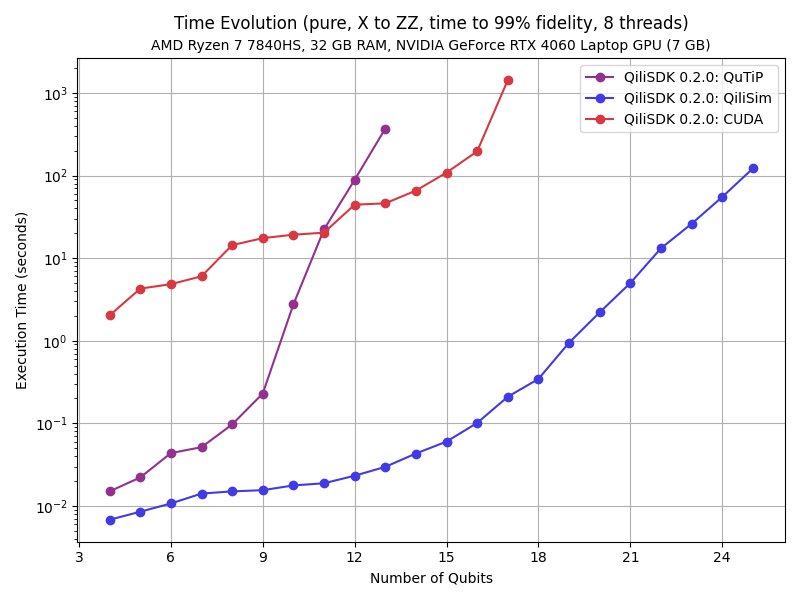
The first benchmark measures the time required for a simple annealing schedule to reach 99% fidelity with the exact ground state as a function of the number of qubits. The results show that QiliSim consistently outperforms both the QuTiP and CUDA backends over the range of system sizes considered in this study. While QuTiP performs competitively for small systems, its execution time increases rapidly as the system size grows. For this particular workload, the CUDA backend incurs a relatively large overhead that outweighs the benefits of GPU acceleration at the tested scales. These results demonstrate that QiliSim provides highly efficient analog simulation on commodity CPU hardware, making it well suited for small- and medium-scale problems.

Execution time required to solve a simple annealing problem from an initial X Hamiltonian to a final ZZ Hamiltonian for different numbers of qubits. The plot shows the time taken by each solver to reach 99% fidelity of the exact ground state with QiliSim outperforming the other backends.

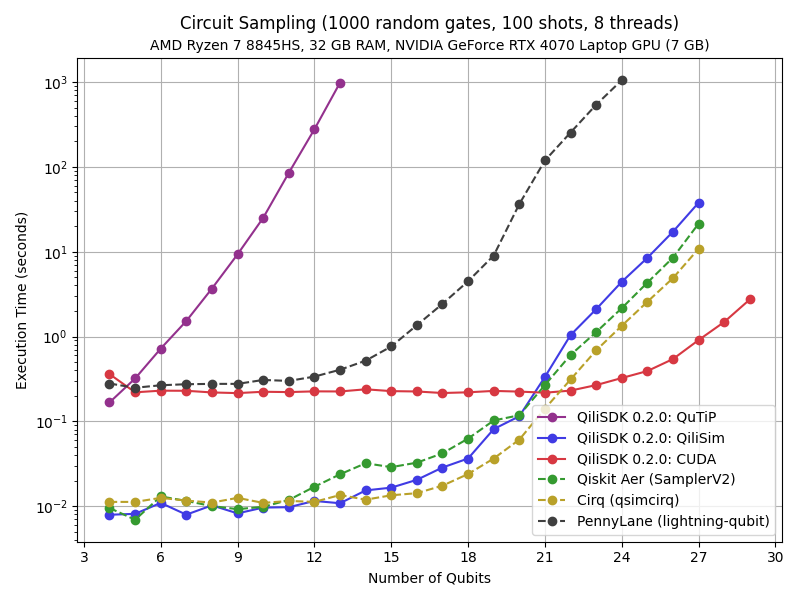
The second benchmark measures the execution time required to sample a quantum circuit composed of 1000 randomly generated gates with 100 measurement shots. The results show that QiliSim is competitive with state-of-the-art CPU simulators, including Qiskit Aer and Cirq for small to medium system sizes. While QuTiP scales poorly and quickly becomes impractical, PennyLane’s Lightning-Qubit backend also exhibits a steep increase in execution time as the number of qubits grows. For larger circuits, the CUDA backend achieves the best overall performance, significantly outperforming all CPU-based simulators.

Execution time required to simulate a circuit of 1000 random gates with 100 measurement shots for different numbers of qubits. The plot shows that QiliSim is competitive with state-of-the-art CPU simulators, while the QiliSDK CUDA backend offers strong performance for large-scale simulations.

Together, these benchmarks demonstrate that QiliSDK provides efficient execution across both CPU and GPU platforms through the QiliSim and CUDA backends. Users can therefore select the backend best suited to their workload and available hardware, balancing performance, scalability, and resource requirements.

8. Getting Started

QiliSDK is open source, Apache-2.0 licensed, and available through PyPI. QiliSDK supports Windows, Mac and Linux, for Python versions 3.11, 3.12 and 3.13. The core package, including the QiliSim simulator, can be installed with:

				
					pip install qilisdk


Optional dependencies are available for additional functionality:

				
					pip install "qilisdk[cuda13]"     # GPU acceleration (CUDA 13)
pip install "qilisdk[openqasm]"   # OpenQASM 2/3 interoperability
pip install "qilisdk[qir]"        # QIR interoperability


To learn more, explore the documentation, tutorials, and source code:

Whether targeting CPU simulation, GPU acceleration, or Qilimanjaro’s quantum hardware, QiliSDK provides a unified environment for developing, simulating, and executing digital, analog, and hybrid quantum workflows.