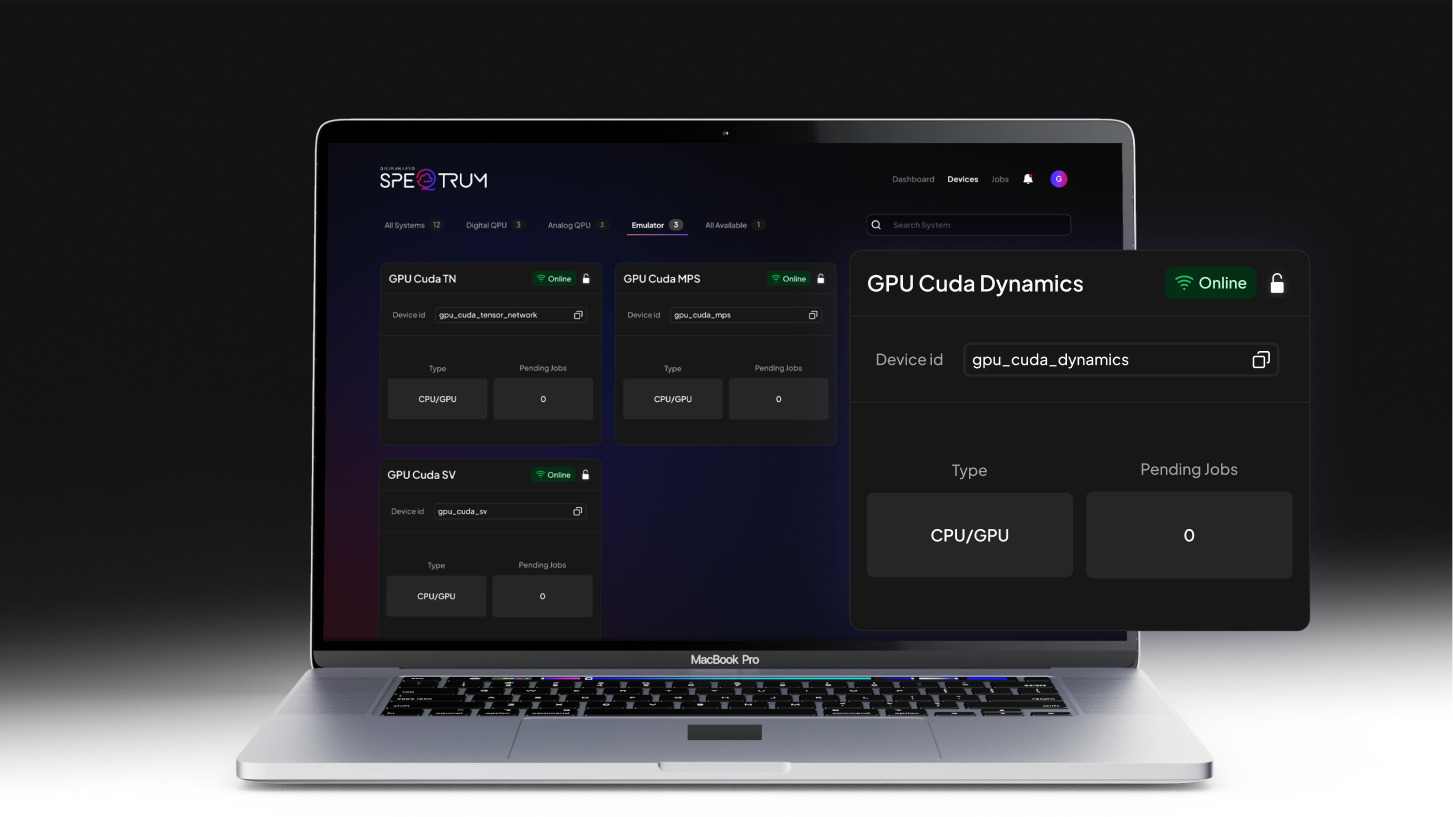
NVIDIA's CUDA-Q now powers GPU emulation inside QiliSDK, extending Qilimanjaro's unique multimodal approach across classical and quantum backends, from CPU and GPU to analog and digital QPUs.
Most quantum software runs on a single kind of quantum hardware, using either the digital or the analog paradigm, or on CPU/GPU emulators. QiliSDK spans them all. It runs across a variety of backends: CPU, GPU, digital QPUs (dQPU) and Qilimanjaro’s analog QPUs (aQPU). This is the multimodality Qilimanjaro is building from, and the vision behind it: that the coexistence of modalities will be the future of supercomputing.
QiliSDK is Qilimanjaro’s Python framework for developing, running and emulating both digital and analog quantum algorithms. Its modular design makes it easy to prototype circuits, build Hamiltonians, design variational workflows and quantum-reservoir models, then deploy them on local or remote backends, classical or quantum. The same high-level program can target a laptop CPU, a GPU, a digital QPU, or Qilimanjaro’s analog QPU through the SpeQtrum cloud and on-prem.
Today we are adding a new backend to that set: an NVIDIA CUDA-Q-powered GPU backend, built for production-scale emulation of quantum workflows on classical hardware, including state-vector and tensor-network emulation. Nothing else in the codebase changes.
The following snippet illustrates how a user can create an analog evolution, then dispatch it for GPU emulation:
					from qilisdk.analog import Schedule, X, Y, Z
from qilisdk.backends import CudaBackend
from qilisdk.core import QTensor
from qilisdk.functionals import AnalogEvolution
from qilisdk.readout import Readout

# Simple quantum annealing example
nqubits = 2
driver = -sum(X(i) for i in range(nqubits))
problem = sum(Z(i)*Z(i+1) for i in range(nqubits-1))
analog_functional = AnalogEvolution(
	schedule=Schedule.linear(driver, problem, total_time=10, dt=0.1),
	initial_state=QTensor.uniform(nqubits)
)
analog_readout = Readout().with_expectation(observables=[problem])

# Run on CUDA-Q GPU backend
cuda_backend = CudaBackend()
analog_result = cuda_backend.execute(analog_functional, analog_readout)
print(analog_result)
This creates a simple quantum annealing example: a linear ramp between an initial Hamiltonian 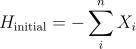
to a final Hamiltonian 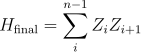 , here just for two qubits. By starting in the ground state of the initial Hamiltonian and slowly transitioning to the final one, the adiabatic theorem guarantees we remain in the ground state, as long as the evolution is slow compared to the gap between the ground state and the first excited state. This leads us to the ground state of our problem Hamiltonian, which is the solution we are after. Here it correctly gives -1 as our final energy, as one would expect from trying to minimize Z0 Z1.
Classical Emulation as a Development Layer
Classical emulation is a permanent part of how quantum teams work. Before running anything on real hardware, teams use emulation to prototype circuits, study system behavior, characterize noise, and establish the benchmarks that quantum results are measured against. It also handles the classical side of hybrid workflows, the pre- and post-processing that wraps every quantum call. Building without it is not a realistic option at any stage of development.
Why NVIDIA GPUs shine for emulating quantum workflows on classical systems
The question then is how to run that emulation efficiently. Emulating a quantum workflow on a classical computer means tracking the full quantum state, whose size grows exponentially with qubit count. On a CPU, this stays practical up to roughly 25 qubits before memory and bandwidth become hard ceilings; beyond that, run times climb from seconds to hours. GPUs, with their wide memory buses, massive parallel arithmetic and multi-GPU NVLink topologies, are today’s state of the art for this kind of workload. They push the practical state-vector frontier to 30 qubits on a single node, and well beyond when tensor-network or distributed-memory methods come into play. NVIDIA’s CUDA-Q is, today, the most productive way to target those GPUs: a clean kernel-based model that maps directly onto NVIDIA hardware, well-tested state-vector and tensor-network engines, and multi-GPU and multi-node execution out of the box.
CUDA-Q as the GPU layer
NVIDIA’s CUDA-Q is, today, the most performant way to target GPUs for quantum emulation. It exposes a clean kernel-based model that maps directly onto NVIDIA hardware. CUDA´Q also integrates well-tested state-vector and tensor-network engines, supports multi-GPU and multi-node execution, and is actively adopted by the broader quantum-software ecosystem. In summary, CUDA-Q is an open-source quantum development platform that orchestrates the hardware and software needed to run useful, large-scale quantum computing applications. CUDA-Q streamlines hybrid application development and promotes productivity and scalability in quantum computing. It offers a unified programming model designed for a hybrid setting—that is, CPUs, GPUs, and QPUs working together. CUDA-Q contains support for programming in Python and in C++.
Rather than reinventing GPU integration, QiliSDK wraps CUDA-Q as a backend, so users get NVIDIA-grade performance without writing CUDA-Q code themselves.
CUDA-Q backend in QiliSDK
QiliSDK exposes CUDA-Q through a single class: CudaBackend. At construction time, the user picks a emulation method and optionally attaches a noise model.
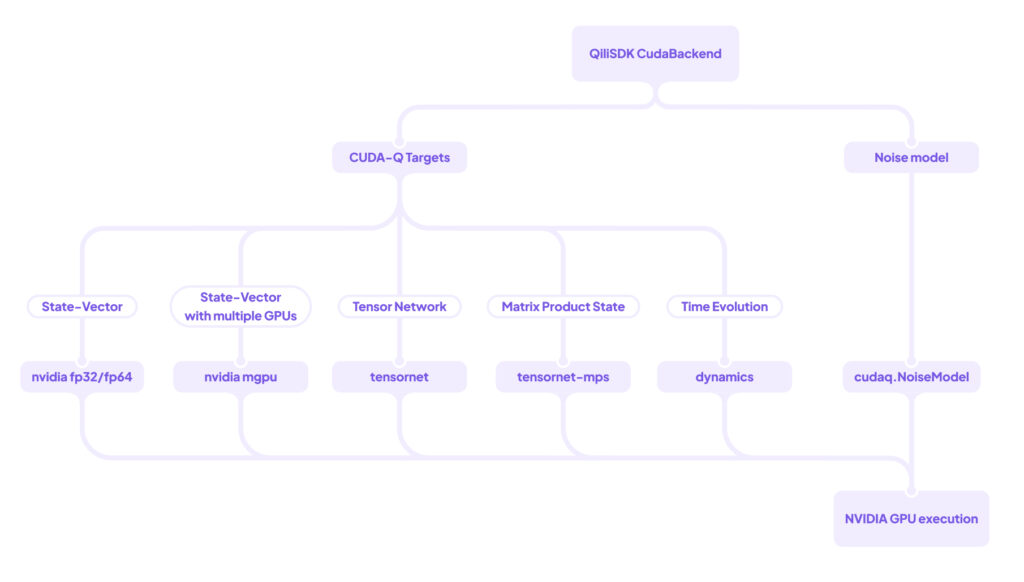
Figure 1: Diagram of the integration of CudaBackend class in QiliSDK involving CUDA-Q backend targets and noise model.
The backend then auto-configures the underlying CUDA-Q target: for state-vector emulation it uses the nvidia target with fp32 or fp64 precision when a GPU is detected, nvidia-mgpu when multiple GPUs are available, or falls back to cpu otherwise; tensor_network routes to CUDA-Q’s tensornet engine for full tensor-network contraction; and matrix_product_state routes to the tensornet-mps target, which exploits 1D MPS structure with bond-dimension truncation to keep shallow or low-entanglement circuits cheap; and analog workflows switch CUDA-Q to its dynamics target. The same CudaBackend object therefore covers single-GPU state-vector, multi-GPU pooled emulation, tensor-network and matrix-product-state engines, and open-system dynamics.
For digital circuits, CudaBackend builds a cudaq.Kernel, transpiles multi-controlled gates into native form, and dispatches each QiliSDK gate through dedicated handler functions to its CUDA-Q equivalent, finishing by either efficiently sampling from the state or returning the final full state of the system. For analog workflows it compiles the schedule’s time-dependent Hamiltonians into a CUDA-Q OperatorSum, maps Pauli operators directly onto spin.x/y/z/i, and runs cudaq.evolve over the schedule’s time grid.
If the user wants a noisy emulation, they can provide a QiliSDK NoiseModel, which is converted into a cudaq.NoiseModel: bit-flip, phase-flip, and depolarising channels map to their native efficient CUDA-Q counterparts, while the more expressive Kraus- and Lindblad-based channels map to the general CUDA-Q noise channels. Noise can be registered globally, per gate type, per qubit, or per (gate, qubit) pair. Parameter perturbations and readout-assignment errors (i.e. p01/p10) are also available, and are handled as pre/post processing.
To summarize, the user can write their quantum workflow as high-level QiliSDK code, which is then automatically converted into an optimized representation that can be efficiently executed on NVIDIA GPUs.
QiliSDK CudaBackend performance
QiliSDK’s CudaBackend scales efficiently from single-GPU to multi-GPU execution, as the following benchmarks illustrate. We consider the same case as in the above example: an annealing task from an X Hamiltonian to a ZZ Hamiltonian. We do this by splitting the evolution into 100 steps, and then taking 1.000 samples of the final state. Although this is an analog evolution, it can be emulated on digital hardware using Trotterization. By first Trotterizing and then emulating via the various digital CudaBackend emulation methods, we observe great scaling performance across both single- and multi-GPU configurations.
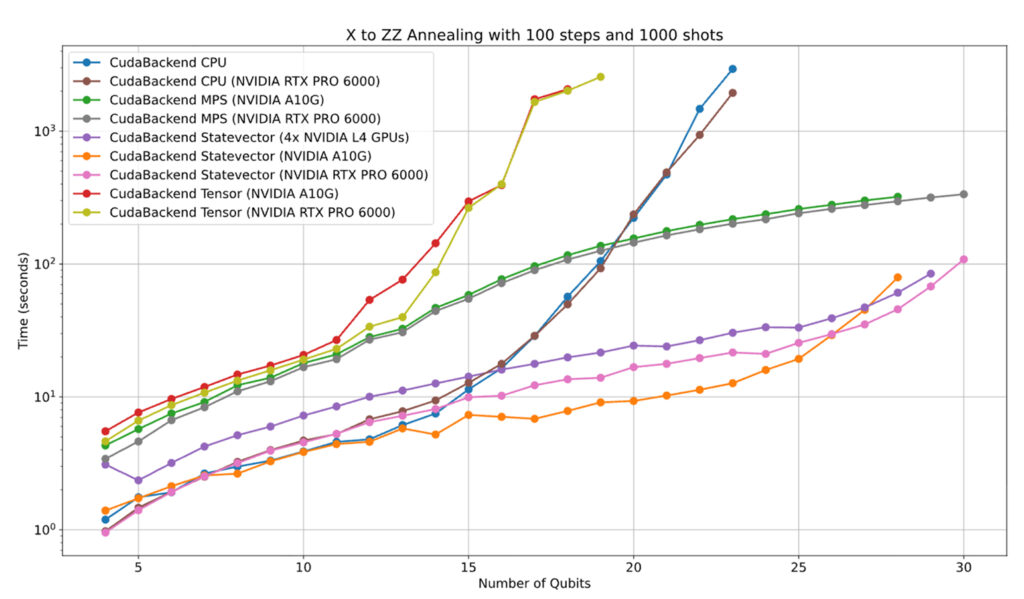
Figure 2: Benchmarking results for a simple annealing task, showing the time taken to perform the evolution versus the number of qubits in the problem. The results show how QiliSDK’s CudaBackend can leverage multiple NVIDIA GPUs to efficiently scale emulations up to 30 qubits.
To take full advantage of the CUDA-Q software stack, the NVIDIA Dynamics backend can be used to perform the evolution directly. Following this approach delivers significantly better performance than the Trotterization digital emulation:
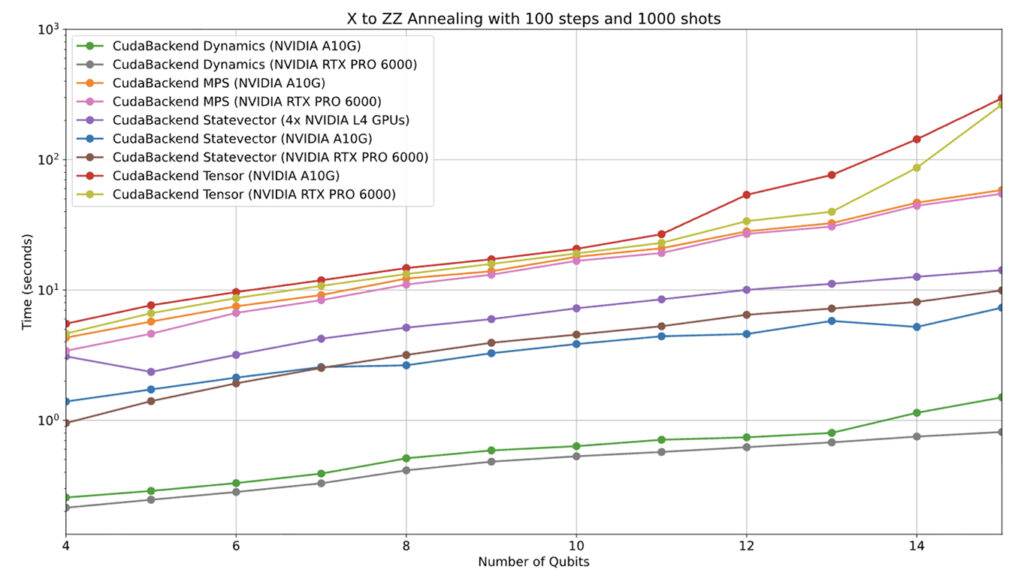
Figure 3: Benchmarking results for a simple annealing task, showing the time taken to perform the evolution versus the number of qubits in the problem. QiliSDK’s CudaBackend using Dynamics significantly outperforms the Trotterized digital evolutions.
Bringing CUDA-Q performance to QiliSDK
QiliSDK now runs digital circuits, analog quantum workflows, and everything in between on a single codebase, across CPU, GPU, and QPU backends. The CUDA-Q integration adds GPU acceleration to that set without requiring any changes to existing programs. The same code that runs on a laptop also runs on a multi-GPU cluster.
That is the stack Qilimanjaro is building toward: one where the boundaries between classical and quantum execution are handled by the software, not by the user.